
New developments and optimizations for FUTURA Engineering | December 2025
📢 New developments for version 5.8
With FUTURA Engineering 5.8, you as a demand collector, planner, purchaser, inspector and your supplier have numerous improvements at your disposal in terms of service item lists, GAEB, service recording and SAP integration. The following new features are grouped by topic and summarize the implemented further developments and optimizations of version 5.8.
Home page
New Dashboard
Modernized home page with direct access to your transactions
The previous Cockpit homepage is now called Dashboard and has been comprehensively revised. There you will now find clearly structured tiles for your used transaction types Projects, Requisitions, Requests (RFQs), Orders, and Service entries.
In each tile, the most recently saved transactions are automatically displayed at the top, including the time and can be clicked and opened directly. The respective status (e.g. "In preparation", "Running", etc.) is also displayed in it.
The new dashboard is particularly helpful for Approvers of service entries, as the most recent service entries submitted by suppliers at the top appear directly in the tile.
The already known lists, such as "Running" or "In Preparation", will still remain available.
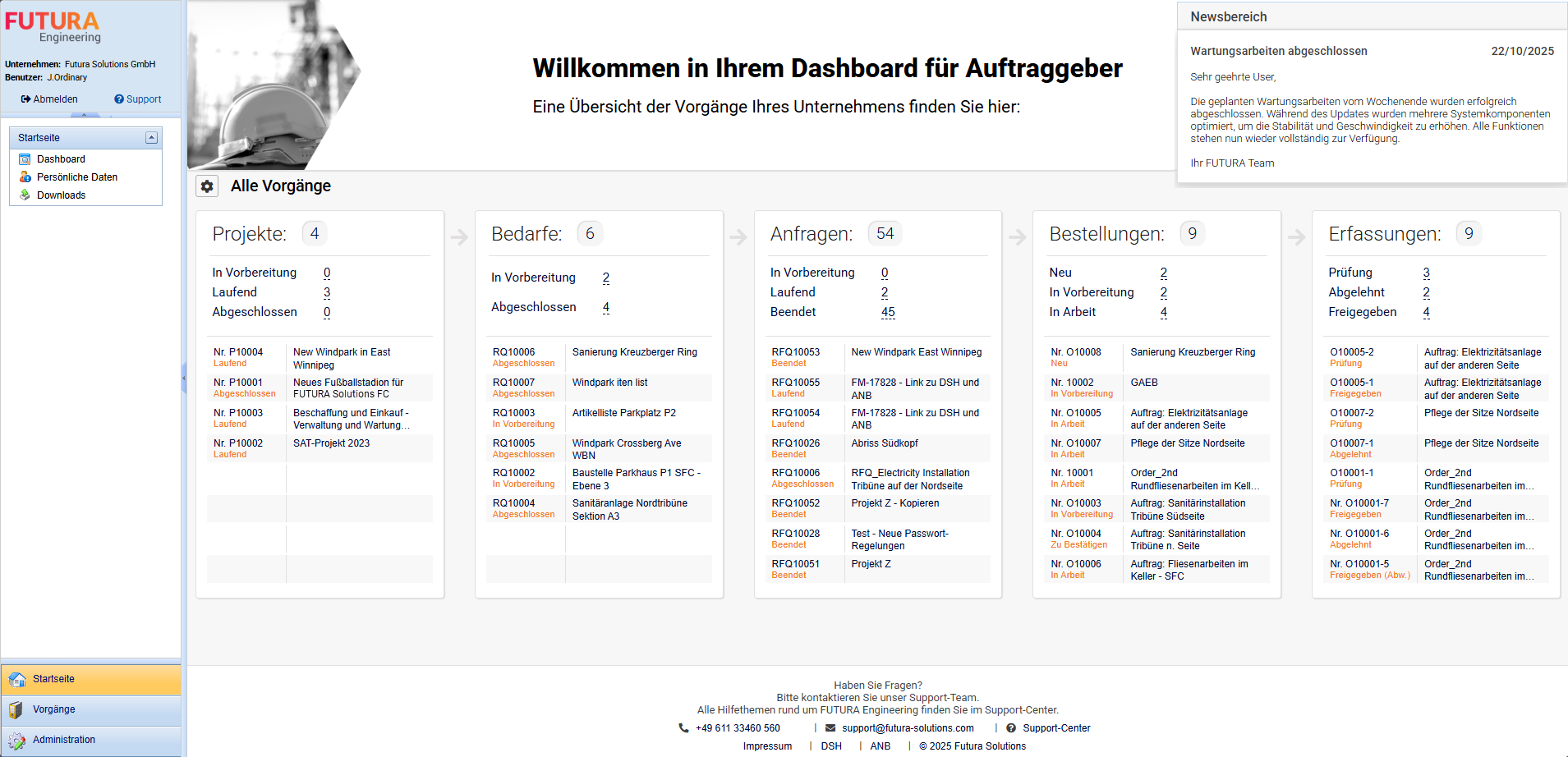
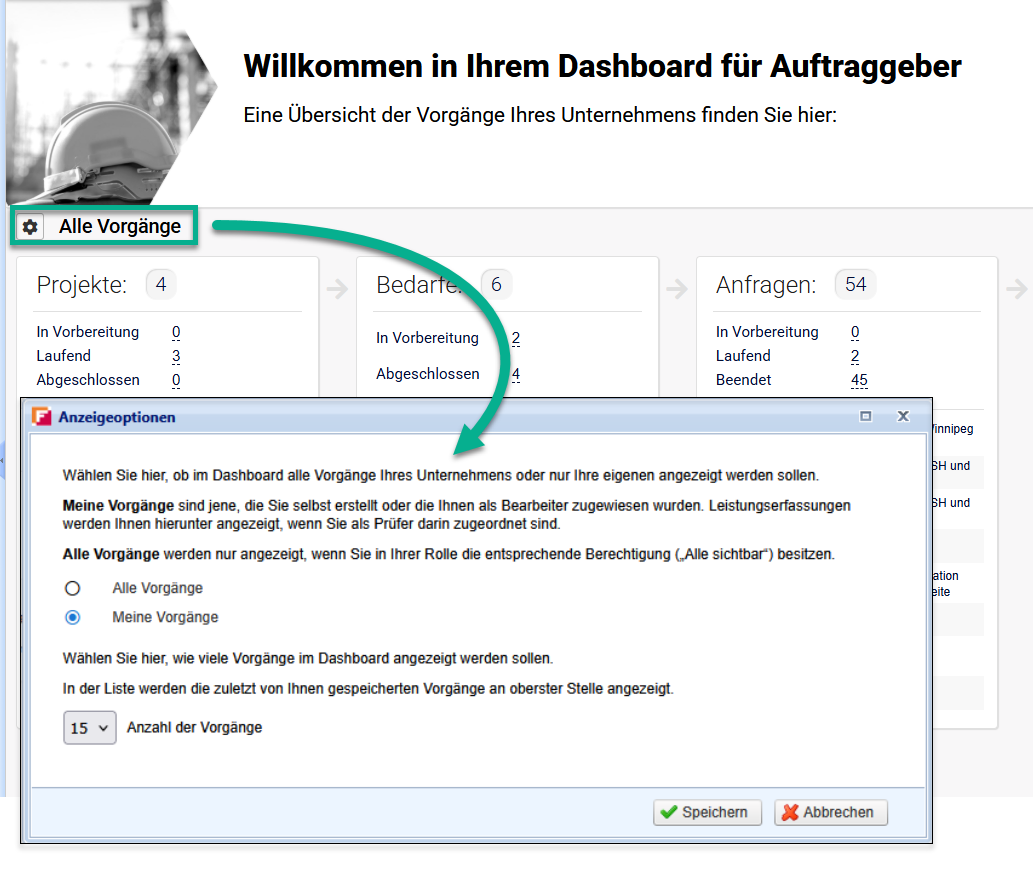
The new gear icon, also allows you to set whether all or only your own transactions should be displayed on the dashboard and whether the number of tasks per tile should be visible.
The new dashboard thus ensures a faster, more direct entry into your daily work.
Item list
Execution description
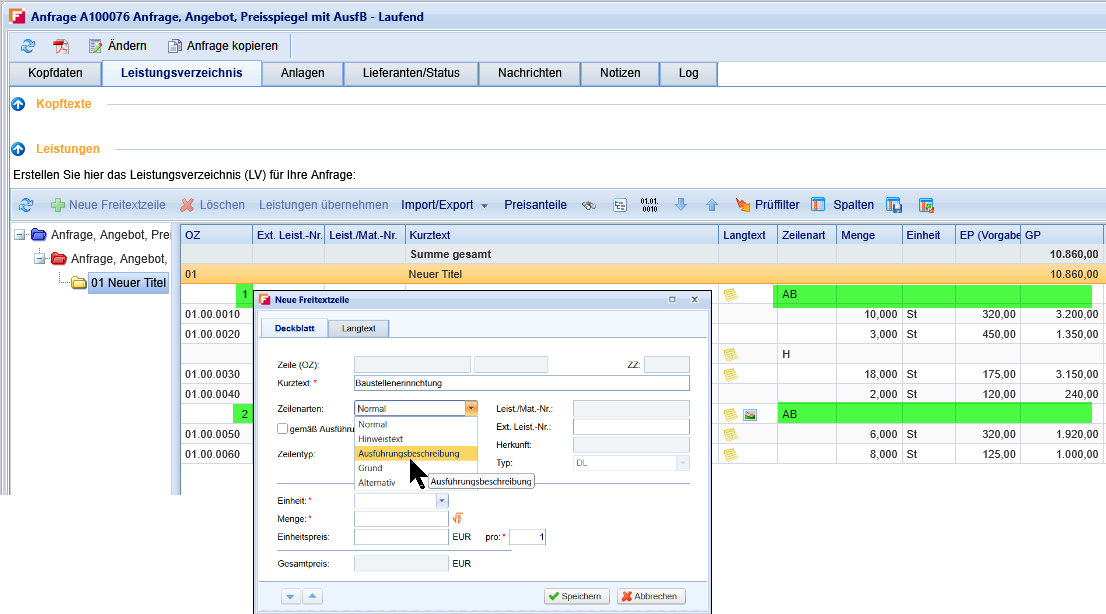
Full support for GAEB Execution Descriptions
FUTURA Engineering now supports item lists with Execution Descriptions according to GAEB DA-XML (e.g., X81, X82, X83, X86), including the additional assignment “Execution according to Execution Description …”.
During import, the Execution-Description item types are correctly detected, assigned to the corresponding items, and fully transferred to SAP when creating contracts and purchase orders. Previous errors in this context for example when creating contracts or purchase orders from such item lists have been resolved.
Evaluation
Reporting & Imports
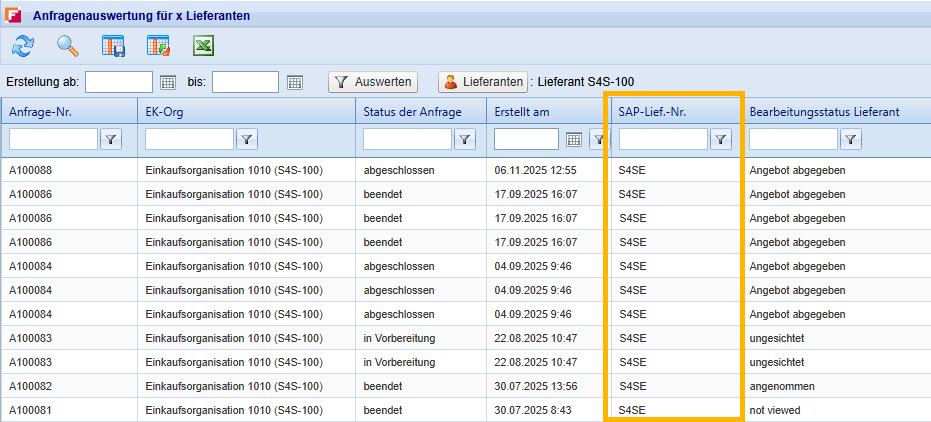
Evaluation of "Requests for x Suppliers" with SAP Document No.
In the "Requests for x Suppliers" evaluation view, the column "SAP Lief. No." Administrators are already familiar with this column from the "All suppliers" view. Now it is also available in the evaluation and supports you in linking transactions directly to the corresponding SAP suppliers.
The new column can:
-
Show and hide via the column configuration,
-
in the order (e.g. directly after "supplier"),
-
as well as when exporting to Microsoft Excel.
This provides you with consistent data for evaluations and tracking, especially in clients with alphanumeric SAP vendor numbers.
Item list
GAEB X84 in all transaction types
GAEB X84 available in all transaction types
Until now, GAEB-DA-84 files (X84) could only be used in purchase orders or on the supplier side. With version 5.8, the import and export of X84 files is now also available in the transaction types Requisition and Request (RFQ). This enables, for example, service providers working with X82 templates to perform unit-price adjustments in the requisition process and generate an X84 file (quotation file) from it. This gives clients greater flexibility in the GAEB exchange process for both sides.
Item list
Use item lists from all sources
Using service item lists from all sources
With the use of organizational units in your company account, the “Add services” function for creating and transferring item lists from other transactions and sources (for example, the master item list) could previously only be taken into account to sources that were assigned to the same organizational unit. The new license and authorization “Use item list from all sources” now applies to all sources used (requisition, request, order, contract, and master item list).
If you use this license as a permission and assign it to a role, users can drag and drop item lists from all sources used in the tenant, even if the original transaction is assigned to a different organizational unit and the user does not have general access rights to that transaction. The original transaction remains invisible. Only its content is available as a source. This allows planners of item lists in particular to work much more efficiently.
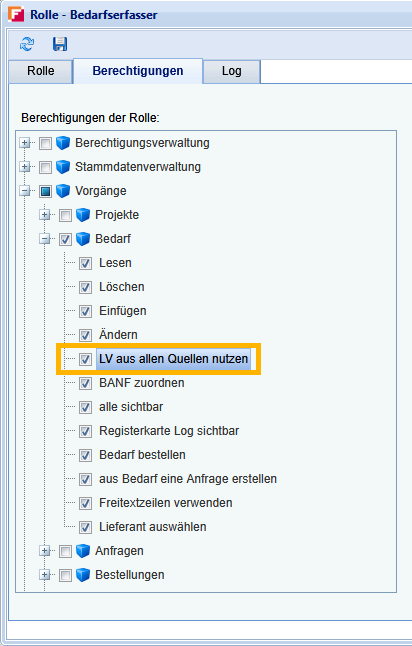
This function requires a separate license and authorization in the roles that we have to provide for your company. If you would like to use this, please let your administrator know. The permission is available for all transaction types:
Demand, Request, and Purchase Order.
Item list
Search function incl. Note Items
Unified item list search including note items
The search function accessible via the binoculars icon has been standardized and enhanced:
-
The search now works consistently across all item-list-based areas. This applies to the transaction types requisition, request, order, master item list, contracts, and service entry.
-
‘Note items’ and ‘Execution Descriptions’ are now fully included in the search in both, short and long text, depending on the selected search options.
-
The “Show all items” function no longer lists only service items but all available item types, including note items and Execution Descriptions.
Additionally, note items, if they are included in the contract, are now also displayed in the “Ads services” dialog in the service entry. This enables you to find the correct item more quickly, regardless of the item type.
Performance recording
Verification of service entries in grid
Column "Approved quantity" more recognizable for the Approver
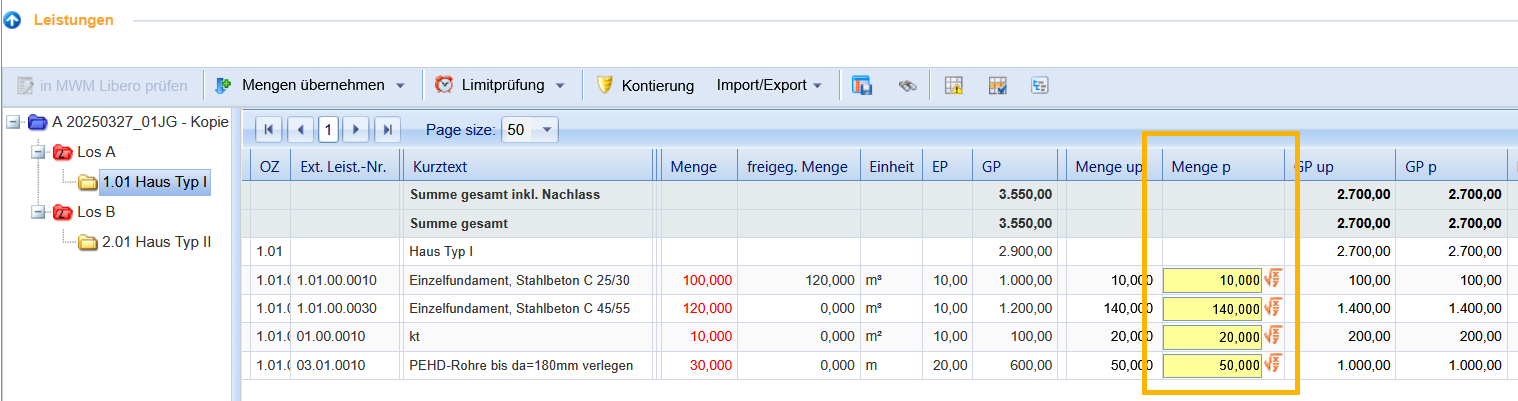
In the service entry for Approvers, the display of the column "Approved quantity" has been optimized. Instead of a narrow yellow vertical line, the entire input field is now highlighted with a yellow background. At the same time, the font size was adjusted to the other cells. For you as an approver, the relevant input field is thus immediately recognizable without the line visually "falling out of the grid".
Service Entry
Entering services from contracts
Optimized “Adopt service” window for suppliers
The service entry for suppliers, especially for orders with a contract reference, has been fundamentally modernized in several steps.
-
The window is larger and adjusted
-
A second table named “Applied service items” has been added
->The upper table continues to show all service items, and the new lower table shows the items that have been adopted. -
A new “Remove” button is available to delete services directly in the same window
-
Quantities can be overwritten afterwards to correct them directly
-
The established Enter plus Tab workflow remains unchanged
-
In the special case of time recording:
-> if you also use time recording within the service entry and work with a time unit predefined by your company (for example “h”), this unit is recognized accordingly and the existing logic continues to apply.
-20251127-092615.png?cb=784588de3d7e6e45258afd05d3e352fb)
Service Entry
Predefine service entry designation
Predefinition of designation for the service entry
As a client, you now have new default settings that allow you to further standardize the service entry for suppliers.
-
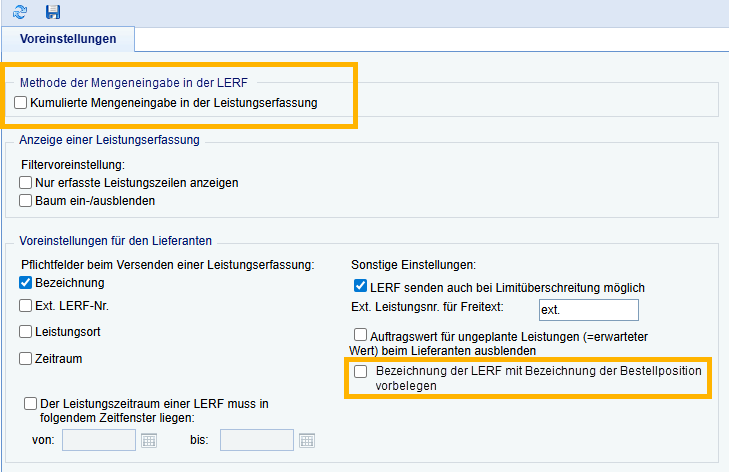
In the administrative settings, within the section for the quantity entry method in the service entry, you can define a default setting for cumulative quantity entry for your tenant. This controls whether the option “Cumulative quantity entry in the service entry” is set by default in the window for creating the order. The preset applies only to newly created orders. Existing transactions remain unchanged.
-
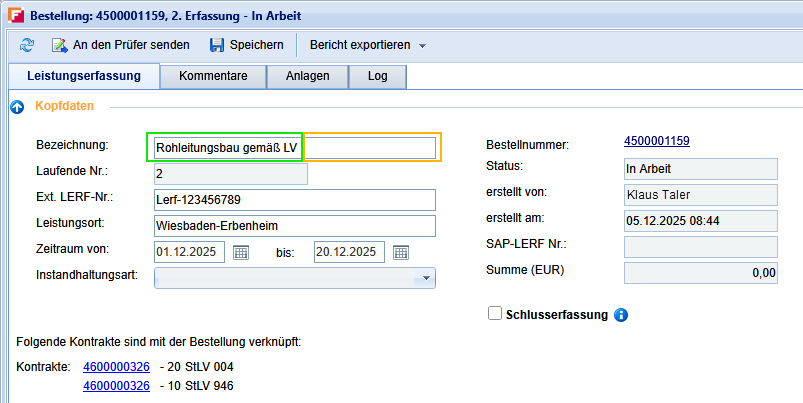
In the section for supplier defaults, the option Pre-fill designation of service entry from the purchase order designation can be activated. If enabled, the description from the order is automatically transferred to the description field in the supplier’s service entry when a new service entry is created (maximum 40 characters in accordance with the SAP short text). It remains editable for the supplier.
This reduces typing effort, ensures consistent descriptions, and allows you to define the preferred billing method across the entire tenant.
View on supplier side in service entry:
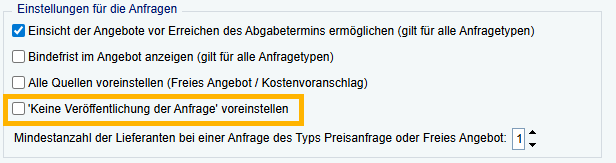
You can also use other presets, such as the No publication of the request option by default.
Order
Confirmation Email
Order confirmation email when transferring to SAP
When an order is created in SAP from FUTURA Engineering, it initially remains incomplete in the SAP system and is not yet finally saved. To make this step more transparent, an order confirmation email can now be triggered.
-
If this option is used, FUTURA Engineering automatically sends an email as soon as the interface transaction has been successful and an order number has been returned from SAP.
-
The email contains the order number, the order name, the order value, and the processor (the logged in user who triggered the order). In addition, you can define your own standard texts for the email, just as you can for other system emails.
This allows the responsible user to receive an email immediately after the successful transfer to SAP, which they can supplement with additional information if needed and then forward to the next responsible person.
This function requires a separate setup for your company account. If you would like to use this, please let us know via your administrator.
Requisition (planning)
Selection of the approver
Reviewer takes over the entire process path
If the approver is selected and assigned in the requisition, this selection is now retained via the following process steps: When transferring the requisition to an RFQ and using the "Order Requisition" function, in which the initially selected approver is transferred to the window and are not selected manually again. This ensures clarity in responsibility and reduces rework during order creation.
Price Comparison List
Performance Optimization
Price comparison accelerated for large item lists
When loading the price comparison list, especially for very extensive item lists with multiple service lines, the “Quotations” tab in the request transactions previously triggered a save routine immediately. This routine continued running even after the window was closed, which led to longer waiting times.
With release 5.8, the technical workflow has been optimized so that loading and closing the price comparison list responds much faster and no prolonged, unexplained background processing is noticeable anymore. You benefit from a much smoother user experience, especially when working with very large item lists.
This function requires a separate setup for your company account. If you would like to use this, please let us know via your administrator.
Personal data
Standard payment terms
Default Payment Term and G/L Account in the Personal Preferences for SAP Data
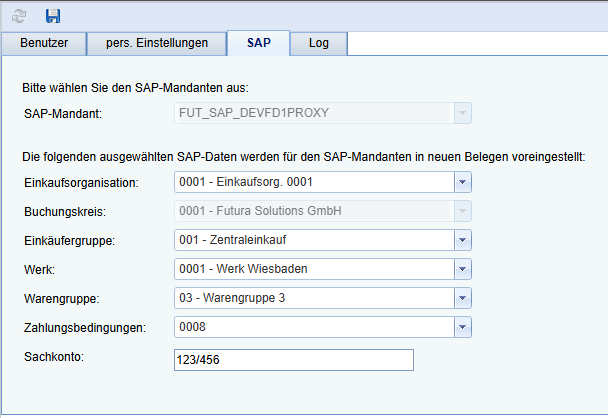
Under your personal data and the SAP tab, you can now select a default payment term. This default setting is automatically preset in the SAP header data for new transactions for the Requisition module, where it can be overwritten for each operation if necessary. This means that frequently used payment terms are not selected again and again, while at the same time the necessary flexibility at the transaction level is maintained.
From now on, you can also store a standardized G/L account in the personal SAP data.
Service Entry
Import from Excel
Importing Contract Lines from Excel into Service Entry
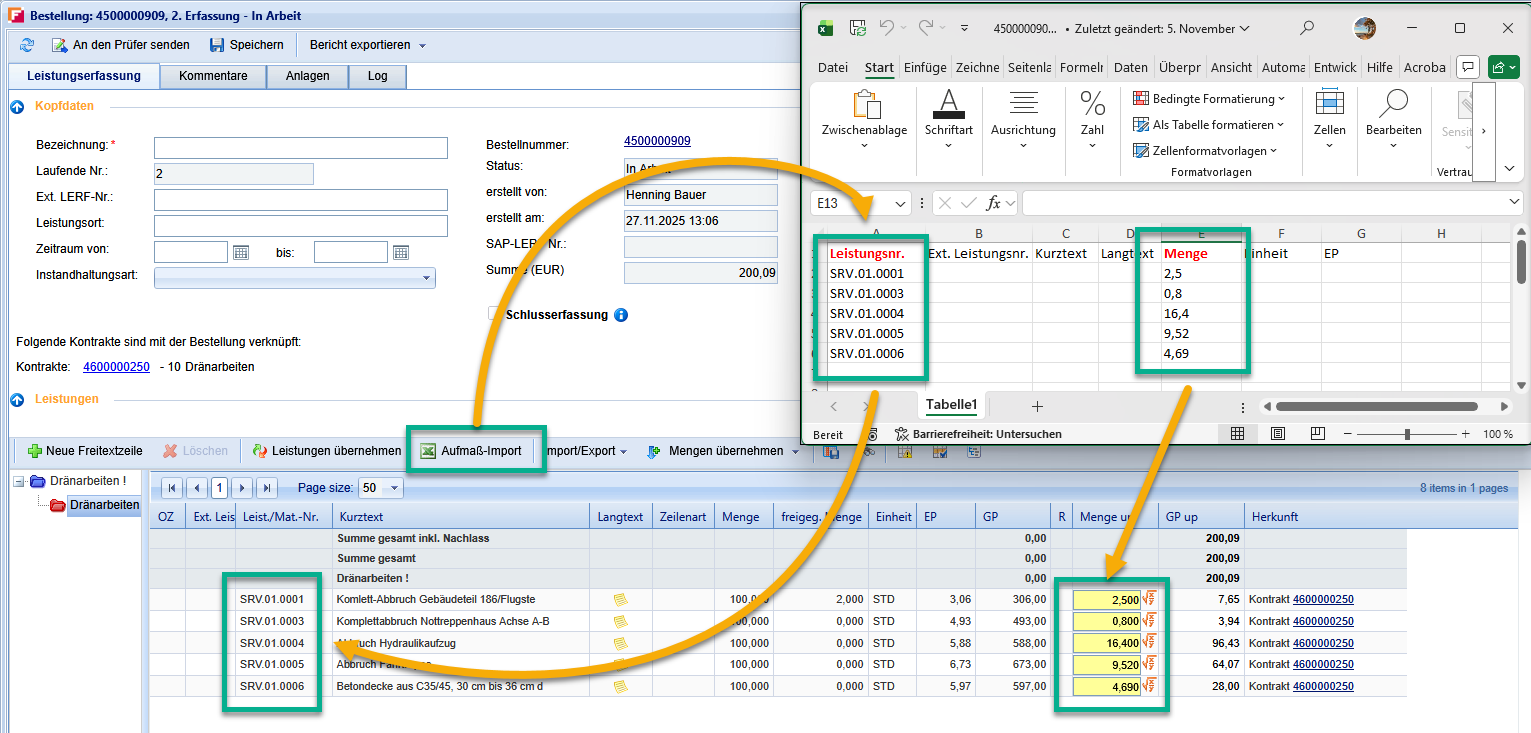
A new import routine for contract lines from Excel has been implemented the service entry for certain customer requisitions. Building on the previous Excel import logic and taking into account existing configuration parameters (e.g. for existing special imports), contract service lines can now be transferred directly from an Excel file to the service entry.
The previous, customer-specific import logic remains functional. The new routine expands the possibilities of quickly and securely transferring larger contract structures from existing Excel lists to FUTURA Engineering, without any manual re-entry.
This function requires a separate setup for your company account. If you would like to use this, please let us know via your administrator.
Service Entry
New column for overview in grid
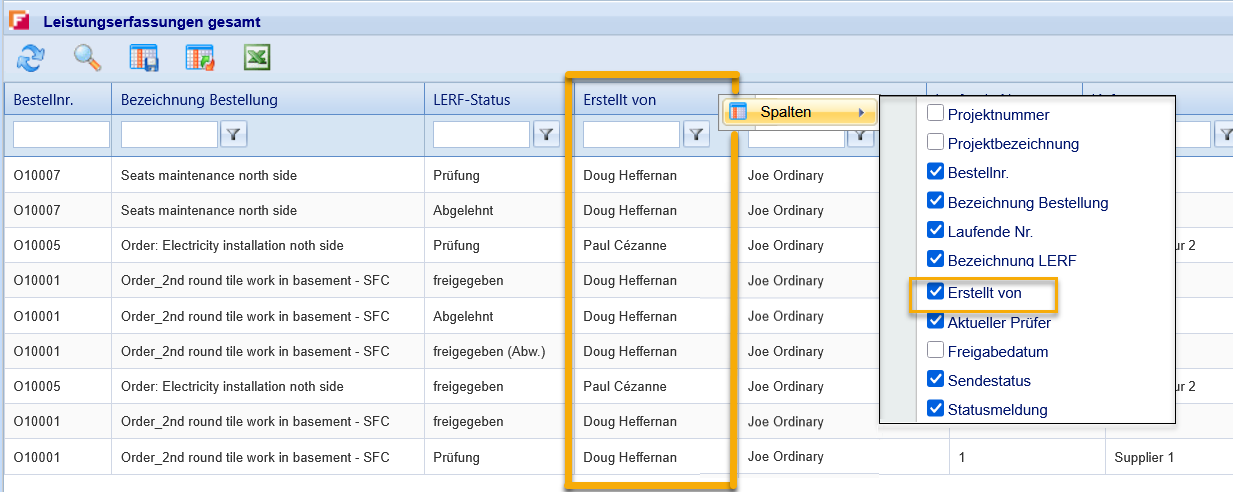
New optional “Created by” Column in the Service Entry overview
The overview of service entries has been enhanced: The new “Created by” column can now be optionally displayed, repositioned, and saved within your user layout. The column is also included in the Excel export. In addition, header readability, column widths, and row heights in the export have been improved. The changes apply to both - client and supplier side.
Request (RFQ)
Performance optimization
Performance optimization when starting RFQs with large item lists
When starting large requests, there were long loading times, especially with large item lists. The aim of this optimization was to enable a significant acceleration of the starting process. Certain checks that were irrelevant to this action have been removed.
Result: The adjustment significantly shortens the start time of large requests. The improvement is clearly noticeable in the factor and leads to a more stable and faster processing of large item lists.