
With the Change Project Assignment function, you can subsequently assign existing Requisitions, Requests, Purchase Orders, and its Service Entry Sheets to another project. Alternatively, you can remove the existing project reference completely so that the transaction is no longer assigned to a project.
The function helps you to react flexibly to changes in the course of the project. This allows you to correctly assign transactions to a project even if the original assignment turns out to be incorrect or the organizational framework has changed.
Example
One Requisition was originally assigned to the project "New Administration Building".
As the project progresses, you realize that the procurement actually needs to be assigned to the "Modernization of the North Location" project.
By changing the project assignment, not only the Requisition, but also the resulting request, order and, if applicable, the associated service recording is automatically moved to the new project.
If a project assignment is changed, this affects not only the selected transaction, but always the entire associated document chain.
Note:
Changing the project assignment does not affect existing account assignments or other existing transaction data.
The entire document chain remains unchanged. Only the project reference is adjusted or removed.
The selection of possible target projects is not limited to specific organizational units. If you have the required permission, you can associate transactions with any available project, or remove the project reference, if allowed by your organizational unit's settings.
Prerequisites
To change the project assignment, the following prerequisites must be met:
The feature must be enabled in your tenant settings. In addition, you must have Modify permission for the Project transaction in at least one of your assigned roles.
If the option "Project specification is a mandatory field when creating transactions (Requisition, Request)" is activated, a project must always be assigned to each transaction. In this case, all you can do is select a different project.
If this mandatory field setting is not activated, you can remove the project assignment completely and set the transaction to "Without project reference".
Note:
If you do not see the Change Project Mapping feature, please check that the feature has been enabled in the tenant settings and that you are assigned the Modify permission for the Project operation. Only if both Requisitions are met can you subsequently change or remove project assignments.

Where can you change the project assignment?
The function is available to you both within a project and directly in the processes.
Change within a project
Open the desired project and switch to one of the following tabs:
-
Requisitions
-
Inquiry
-
Order
There you will find the Change Project Assignment function. After you select a transaction, you can customize its project assignment.
When you call the Change Project Assignment function, a dialog box opens for selecting a new project. Select the desired target project and confirm your selection.
The project assignment of the selected transaction is then updated. At the same time, all linked transactions in the same document chain are automatically transferred to the new project.
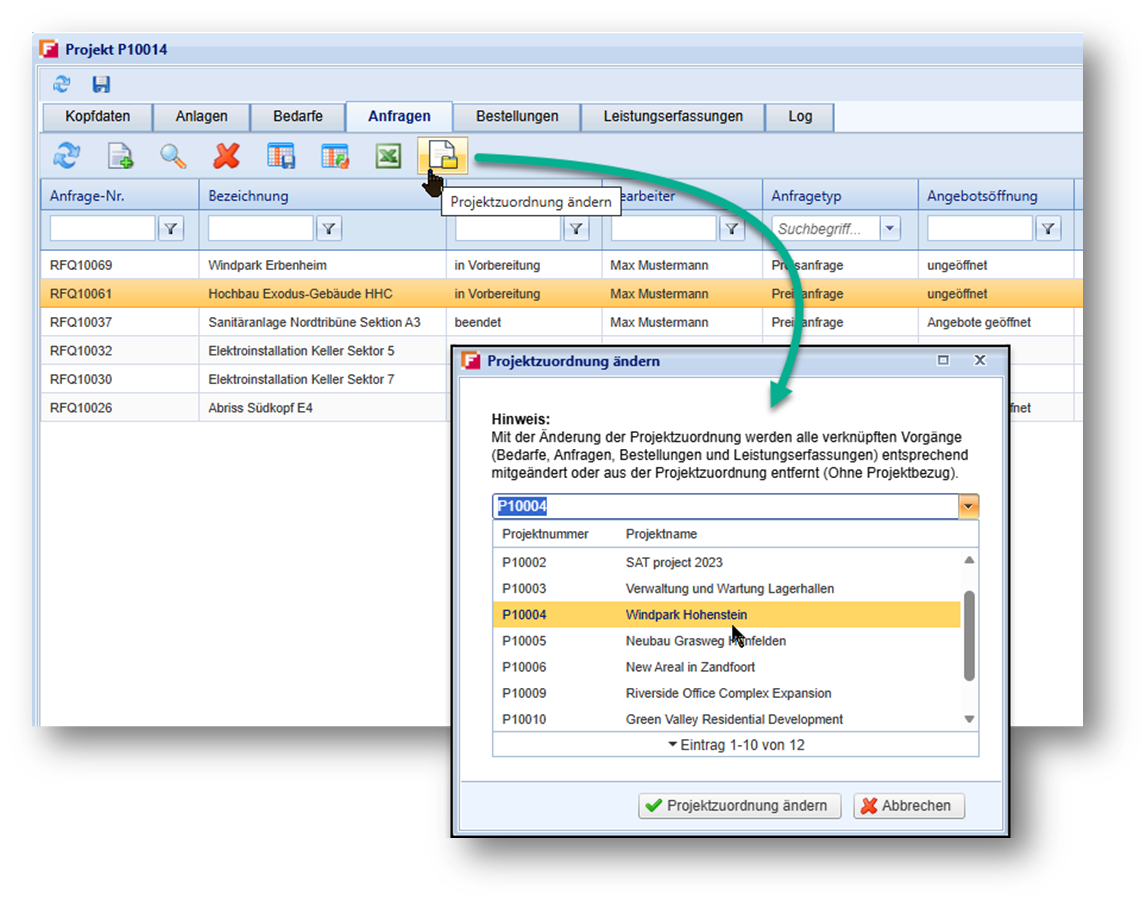
Change directly in the process
Alternatively, you can change the project assignment directly within a transaction. This option is available in the header data of the Requisition and Request for Transaction categories. The function works identically to the change within a project.
The following is the example in the inquiry:
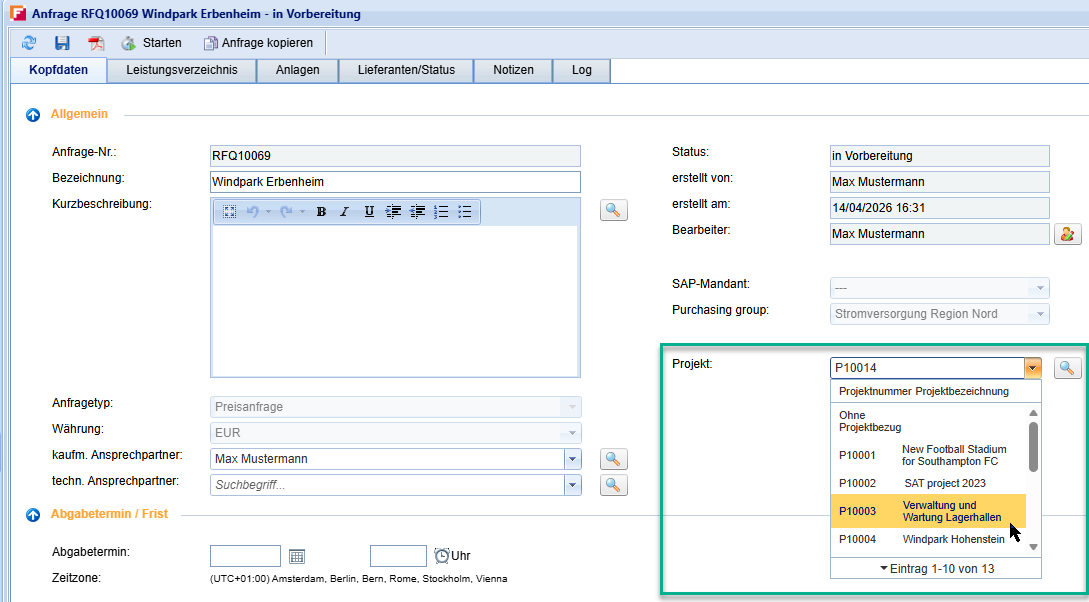
Remove a project reference
If specifying a project is not mandatory in your system, the additional option "Without project reference" is available in the selection list. Select this option to completely remove the existing project assignment. The transaction and all related documents in the document chain remain fully intact, but are no longer assigned to a specific project.
This can be useful if, for example, you later determine that a procurement should not be linked to a project or should instead be handled as a general operational requirement.
Impact on the document chain
Any change to a project assignment always applies to the entire document chain.
If you assign a transaction to a different project, all linked follow-up documents are automatically moved to the selected project as well.
If you remove the project reference, the project assignment is removed from all linked transactions within the document chain.
Depending on the process, the following document types may be affected:
-
Requisitions
-
Requests
-
Orders
-
Service Entry Sheets
This ensures that the entire document chain remains consistent at all times.
What happens to inherited attachments?
Attachments that have already been inherited remain unchanged when a project assignment is modified.
If you subsequently assign an existing transaction to a different project, attachments from the new project are not transferred retroactively to existing transactions.
This behavior ensures traceability and audit compliance. It prevents documents from being added to existing transactions after the fact when those documents were not part of the project at the time the transaction was originally created or processed.
For newly created transactions within the target project, the standard inheritance logic continues to apply. New requisitions, requests and orders automatically inherit the project's attachments as usual.