
New developments and optimizations for FUTURA Engineering | June 2026
📢 New developments for version 5.9
With FUTURA Engineering 5.9, requisitioners, planners, buyers, approvers, and suppliers benefit from a wide range of enhancements and new features. This release focuses on greater flexibility in project management, faster and more efficient RFQ processing, and substantial improvements in system performance and stability, particularly when handling large volumes of data.
Users also gain access to enhanced analysis capabilities within the price comparison list, streamlined workflows for service entries, and noticeably improved responsiveness throughout the system. Performance improvements are especially evident when exporting Excel files and working with extensive service specifications. In addition, version 5.9 introduces further enhancements to supplier management, increased transparency across key processes, and additional safeguards within order processing.
The following sections are organized by functional area and provide an overview of the most important new features, enhancements, and optimizations included in FUTURA Engineering 5.9.
Dashboard
Creation of New transactions
Simplified entry into new Projects, Requirements and RFQs
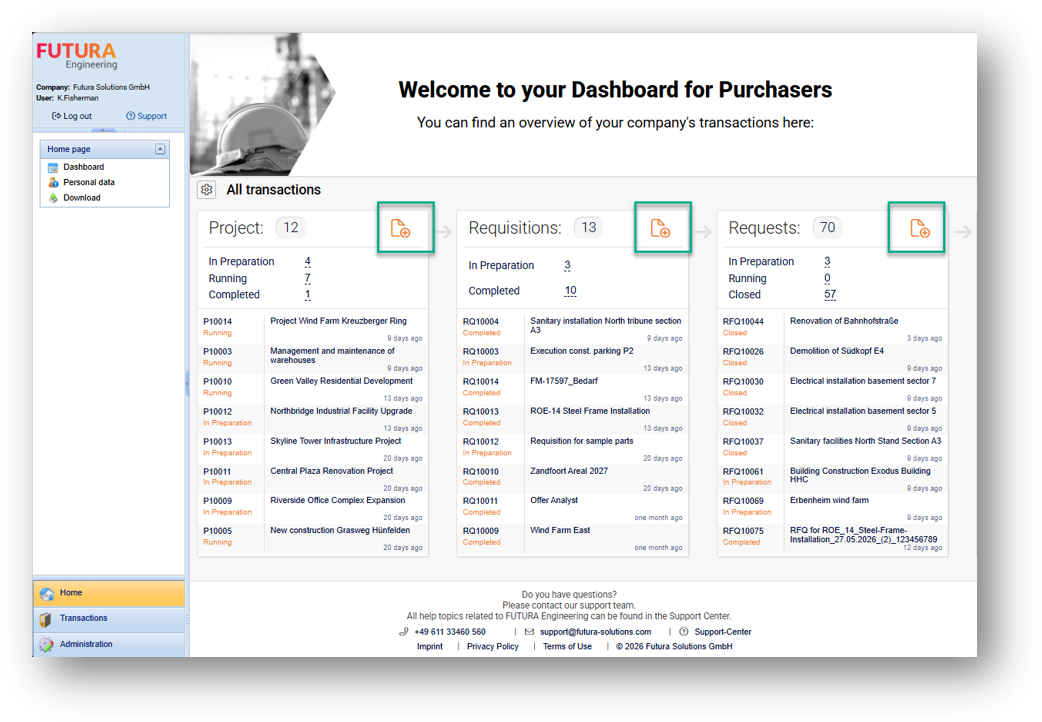
The dashboard has been functionally expanded. You can now create new projects, requisitions or RFQs directly from the respective tiles. The rights check corresponds to the familiar logic from the respective list views, so that no additional configurations are necessary.
Project Management
Flexible Project Assignment for transactions
Extended control of project assignment for Requisitions, RFQs and Orders
This version closes a central functional gap in the handling of project assignments. Until now, it was not possible to subsequently change or completely remove project references from transactions once they had been set. This led to considerable restrictions in operational work, especially in dynamic project progressions.
Users with the appropriate authorization ("Change" in the Project operation) can now:
-
Assign transactions including their entire chain to another project
-
Remove project assignments completely
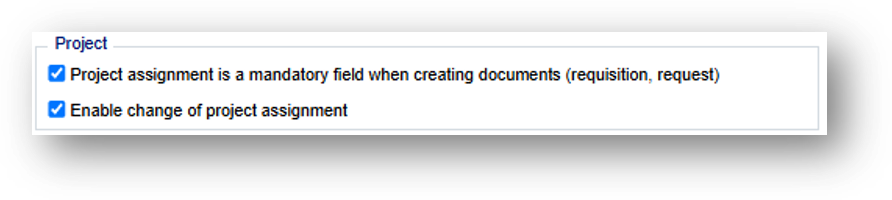
You can set up the new Enable Change of Project Assignment feature in the settings with the appropriate authorization for your organizational unit.
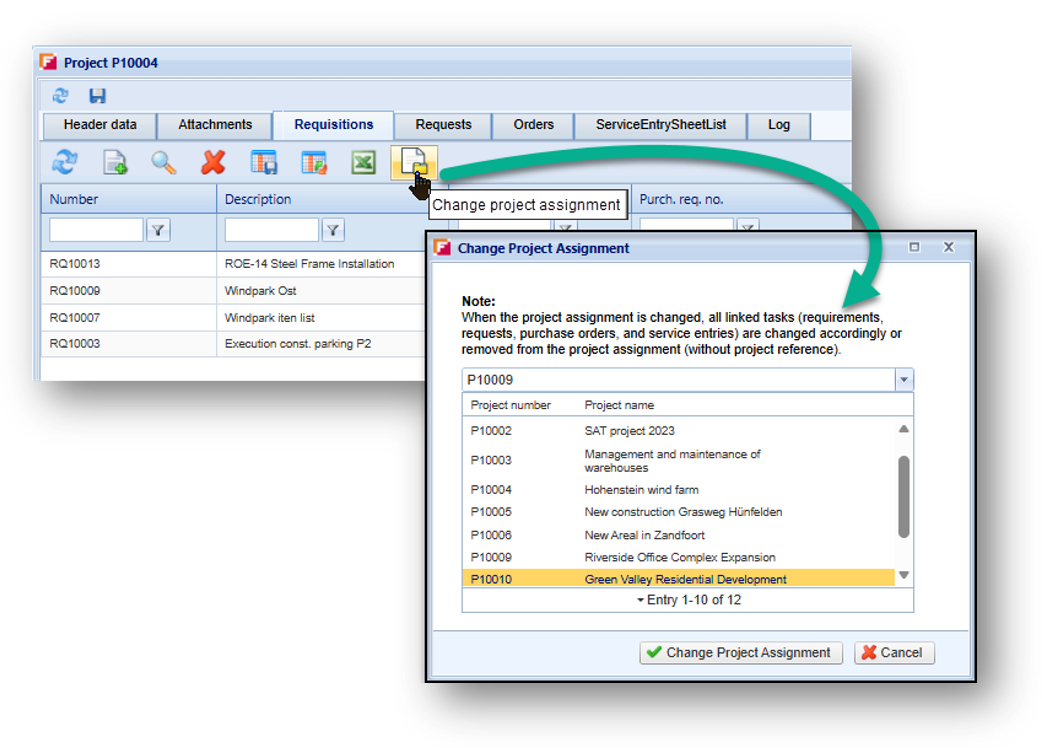
The function is available both directly in the project context (via a new button in the Demand, RFQ and Order tabs) and within the processes themseitem listes (Demand and RFQ). A dialog supports the selection of a new project or the removal of the assignment. If your organizational unit is also required without the Project information option, you will have to... , you can also remove projects from projects altogether by selecting the "Not related to project" option from the drop-down list.
Existing dependencies such as inherited assets remain unchanged.
Orders & Service Entries
New module for evaluation
New Evaluation for Purchase Orders and Service Entries
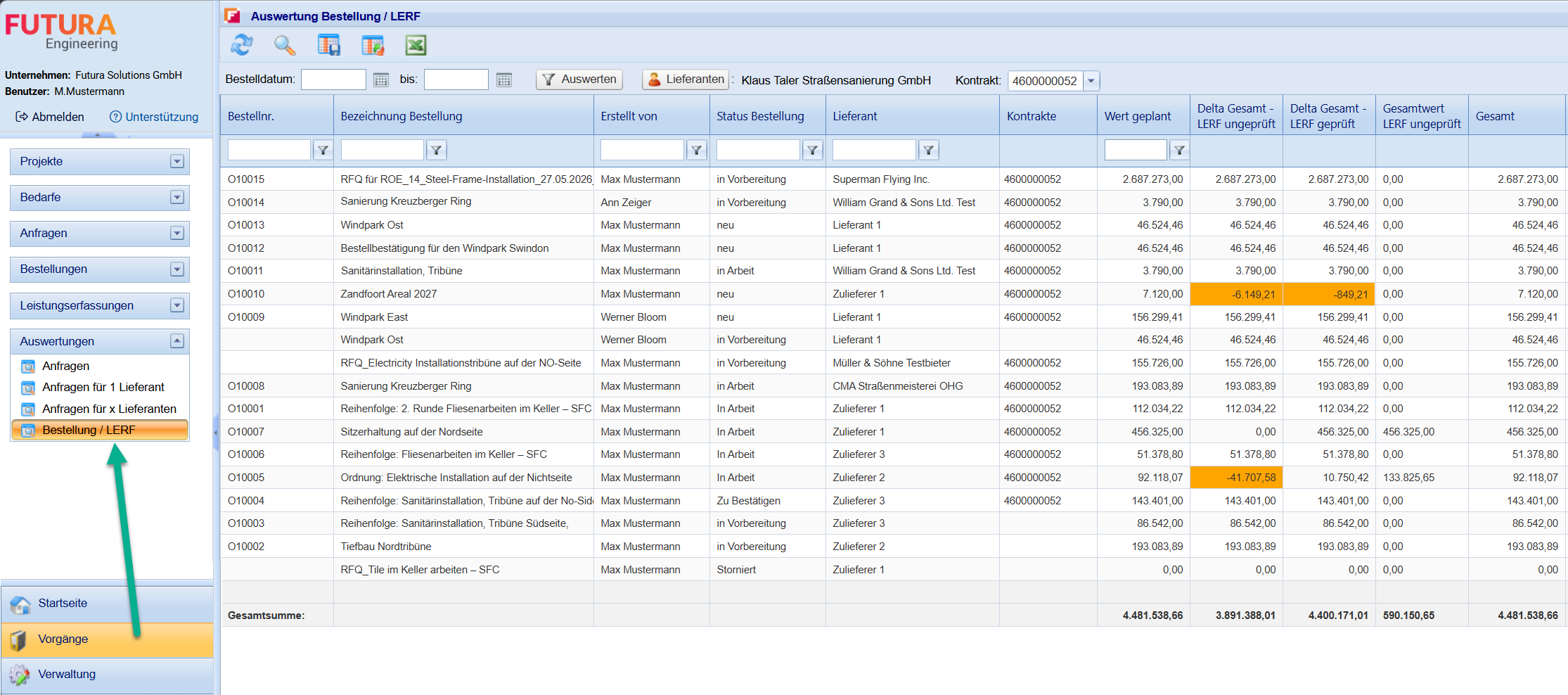
Version 5.9 introduced the new Purchase Order / LERF evaluation. It enables a central evaluation of orders, contracts and service entries and thus creates a transparent overview of order volumes, services already recorded and the current billing status. In addition, the evaluation can be used in combination with single or several supplier companies.
The evaluation supports orders from FUTURA Engineering as well as SAP orders (start in SAP) and provides the relevant commercial key figures in a common view. In addition to order and supplier data, contract information, planned and unplanned order values, and unaudited and audited quantities from service entries are also displayed. In addition, various delta values are calculated in order to be able to quickly identify discrepancies between order values, contract volume and services that have already been recorded.
Filters for order date, suppliers and contracts are available for targeted analysis. The evaluation can be filtered and sorted according to the available columns and quotations total rows for all relevant commercial values. In addition, columns can be customized, layouts can be saved and the results can be exported directly to Excel.
With the new evaluation, purchasing and project managers have a powerful way to evaluate orders and service entries across the board and to be able to track the current status of contracts and settlements at any time.
Request For Quotation
Flexibly adjust the deadline
Direct adjustment of the submission date without working copy
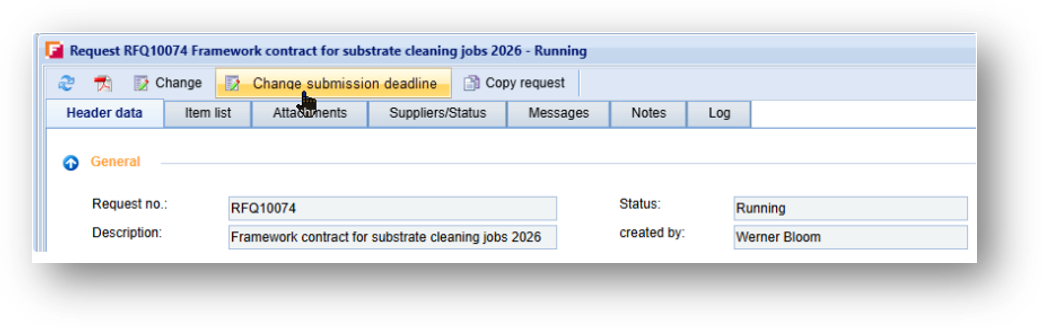
A new function for direct adjustment of the submission date is now available
for ongoing RFQs. Previously, this required a working copy, which led to unnecessary delays, especially in the case of large item lists.
The new solution integrates a button directly into the RFQ, which is only visible in the "Ongoing" status. A new appointment including time can be set via a dialog window.
The feature includes:
-
Date validation (only future dates allowed)
-
Automatic sending of a system mail
-
Logging of the change in the system log
This enables a quick and transparent adjustment of deadlines.
Specifications
Support of StLK numbers
Processing of external standard service items
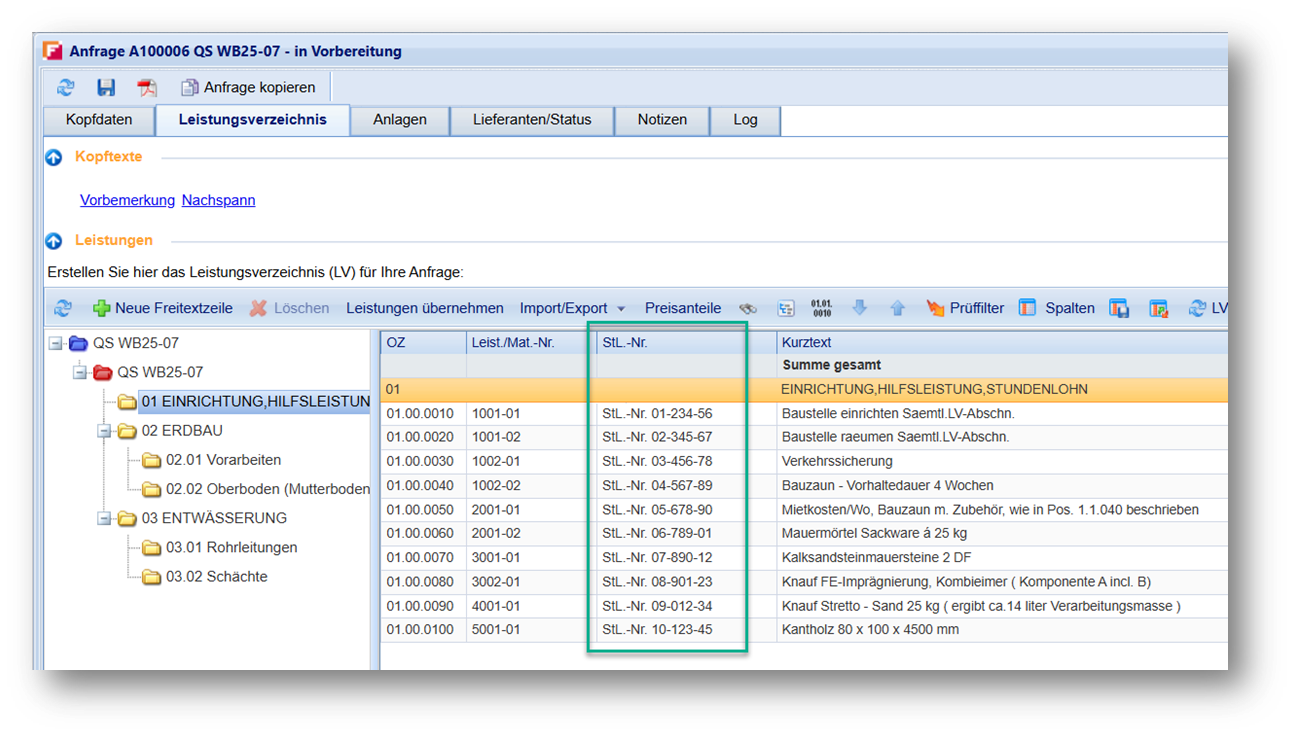
The system now supports the processing of StLK numbers in bills of quantities. These are often used in externally created GAEB files. By integrating this information, corresponding items can be correctly mapped and further processed, which is particularly important for projects relevant to funding.
Price comparison list
New Excel layout for direct comparison
Structured and direct comparison of unit prices and total prices
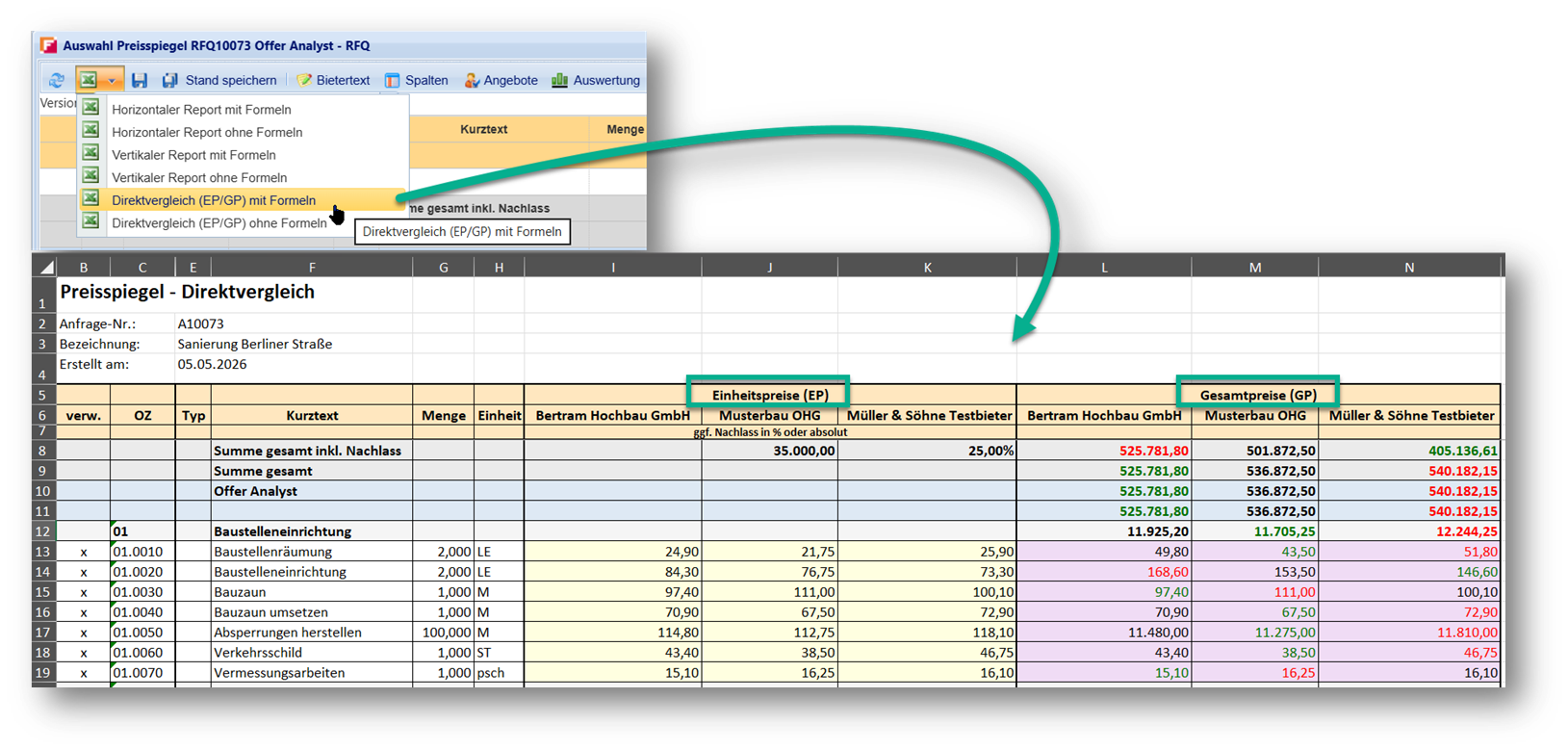
A new Excel layout is available in the price comparison list, which significantly improves the direct comparison of quotations.
The focus of the new layout is on the clear comparison of the unit prices (EP) and total prices (GP) of all quotations. The presentation has been clearly structured and visually supported, so that relevant information can be recorded and evaluated more quickly.
As usual, the export of this layout is available both with and without formulas and can be used directly from the system.
Price Data Base
Optional use of medium price
Display and transfer of the medium price of item list elements from master Item List
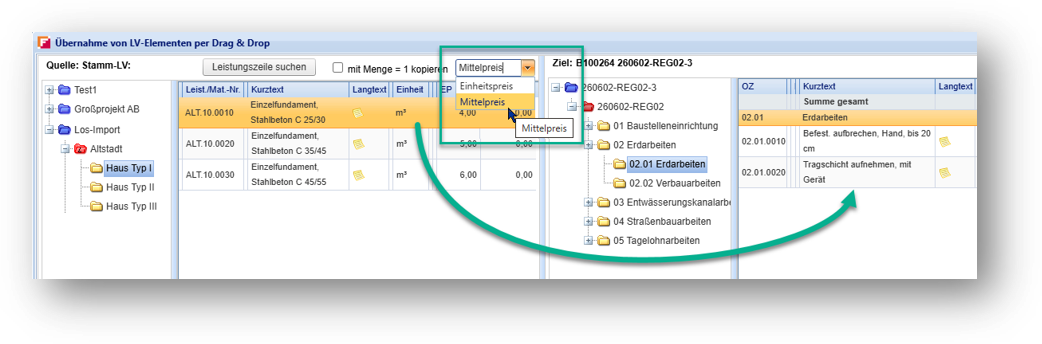
If your organizational unit uses the price database, the medium price will now also be displayed in the "Apply services" window. This makes it easier for planners of the item lists to compare the available prices and select them specifically for the creation of the BOQ.
When dragging and dropping course elements from the root item list, an additional column "medium price" is displayed in the item list. Planners can then continue to specify which price is to be included in the item lists using the existing selection field:
-
Unit Price (EP)
-
Medium price
Since both values are now directly visible, the selection becomes much more transparent for you. In addition, the medium price is now also displayed directly in the list view of the master item list.
This function requires a separate license and authorization in the roles, which we can provide for your company for a fee. If you would like to use this, please let us know via your administrator.
Service Entry Sheet
Account Assignment to Selected Service Items
More efficient processing of large service entries through selected mass account assignment
The account assignment function in activity entry has been extended. Whereas previously it was only possible to assign accounts at title or item level, it is now possible to select individual service lines in a targeted manner and assign them together.
Checkboxes in the grid can be used to select several service lines. The account assignment is then defined once and automatically transferred to all selected rows.
Key features of the new feature:
-
Account assignment is based exclusively on a percentage basis
-
Existing account assignments are overwritten without additional warning
-
For large amounts of data (over 50 service lines), a dialog supports the selection between visible and all rows
This enhancement enables a significant increase in efficiency in the processing of extensive service entries.
Performance Acquisition
Improved Ergonomi Expansion
More space for relevant content thanks to a more compact presentation
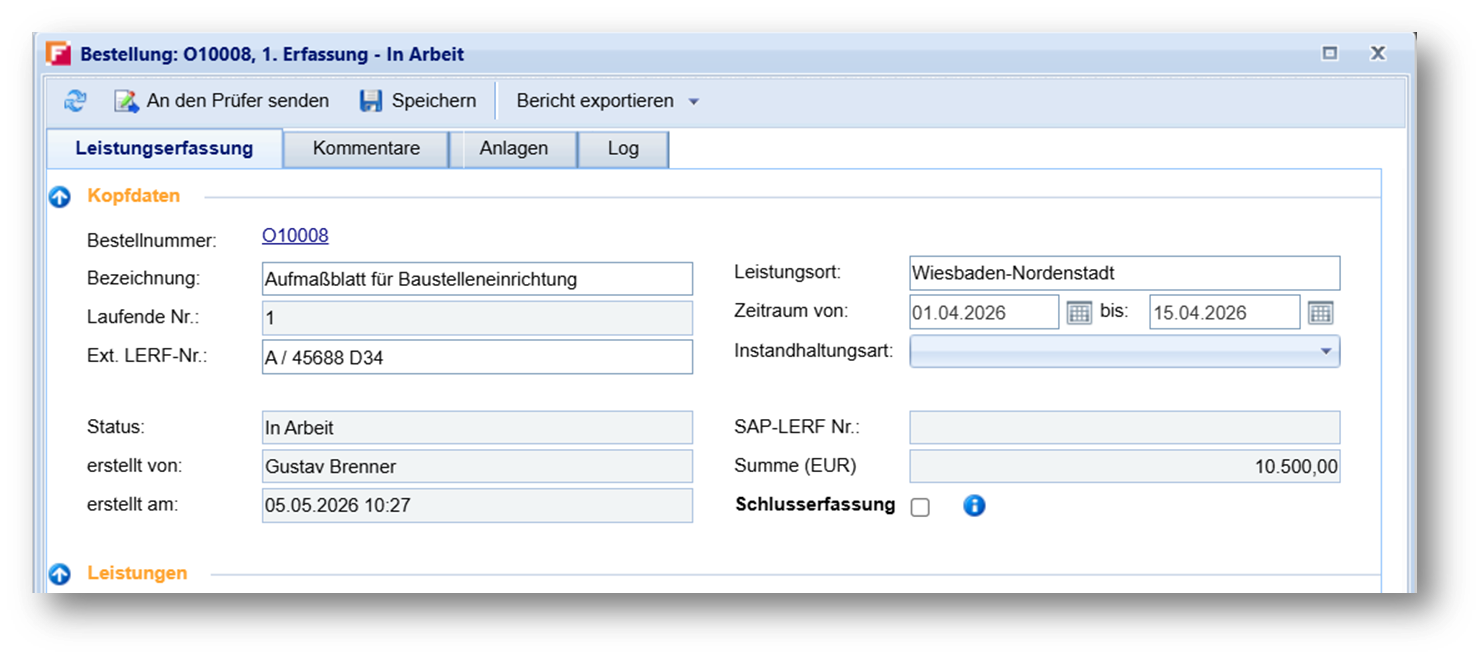
The user interface of the power recording system has been revised in terms of ergonomics and usability. The previously very space-intensive head area has been reduced and structurally optimised.
Due to a horizontal arrangement of the fields as well as collapsible areas, there is now significantly more space available for the item lists.
This adjustment improves clarity and makes daily work much easier.
Supplier management
Organization ID in supplier catalogue
Transparency via joint company logins without disclosure of technical data
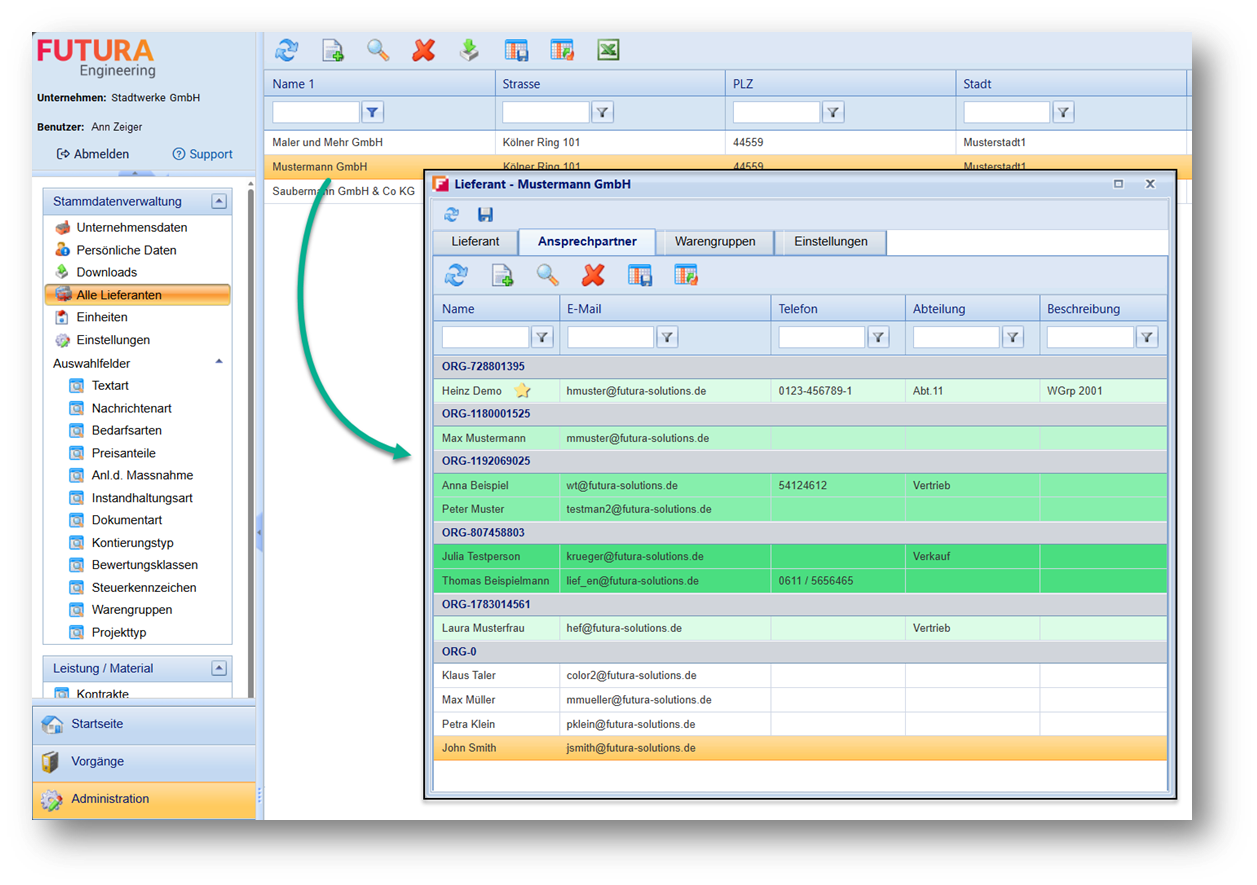
Due to data protection requirements, previously registered contacts in your supplier catalogue were not initially associated with their company or made visible to other contacts. This is because the registration data contains personal information that may not be disclosed without appropriate justification.
To provide greater transparency regarding organizational relationships while maintaining compliance with data protection regulations, a new Organization Identifier has been introduced. This identifier allows contacts using the same company login to be visually grouped together without exposing any technical login details or personal information.
The identifier is anonymized, unique, and stable. As a result, organizational affiliations can be recognized more quickly while ensuring that data protection requirements continue to be met.
This feature helps you identify relationships between contacts more efficiently and makes supplier management easier to navigate. Existing registrations are recognized automatically by the system. When creating new contacts based on their email address, the system will indicate whether they are already assigned to an organization or whether they are not yet associated with any organization.
This function requires a separate license and authorization in the roles, which we can provide for your company for a fee. If you would like to use this, please let us know via your administrator.
RFQ
Performance for large item lists
Reduction of loading times for several thousand service lines
The start of inquiries with very large service specifications has been significantly optimized. In the previous implementation, redundant checks led to unnecessary delays.
The removal of these checks has improved performance.
This optimization has a positive effect, especially for large projects with several thousand service lines, and significantly improves the user experience.
Performance recording
performance during dispatch optimized
Significant reduction in loading times for large contracts
The dispatch of service journals has been optimized especially for large contract service specifications. Previously, loading all contract data led to noticeable delays.
Through targeted optimizations, the sending dialog now appears almost immediately, regardless of the size of the underlying contract.
In quality assurance tests, loading times were reduced from up to 17 seconds to less than 1 second. This greatly improves the response speed of the system and ensures a smoother workflow.
Excel export
stability and performance improved
Correction of incorrect dialog behavior
The Excel export for requirements and inquiries has been comprehensively revised. In the past, item lists had extremely long runtimes and UI problems.
By optimising the export process, it was possible to significantly reduce transit times. At the same time, it has been ensured that the dialog box closes correctly after the export is complete.
These adjustments ensure a more stable and reliable use of the export function.
Excel and PDF report
Extended information in Lerf reports
Enhanced LERF reports for more transparency
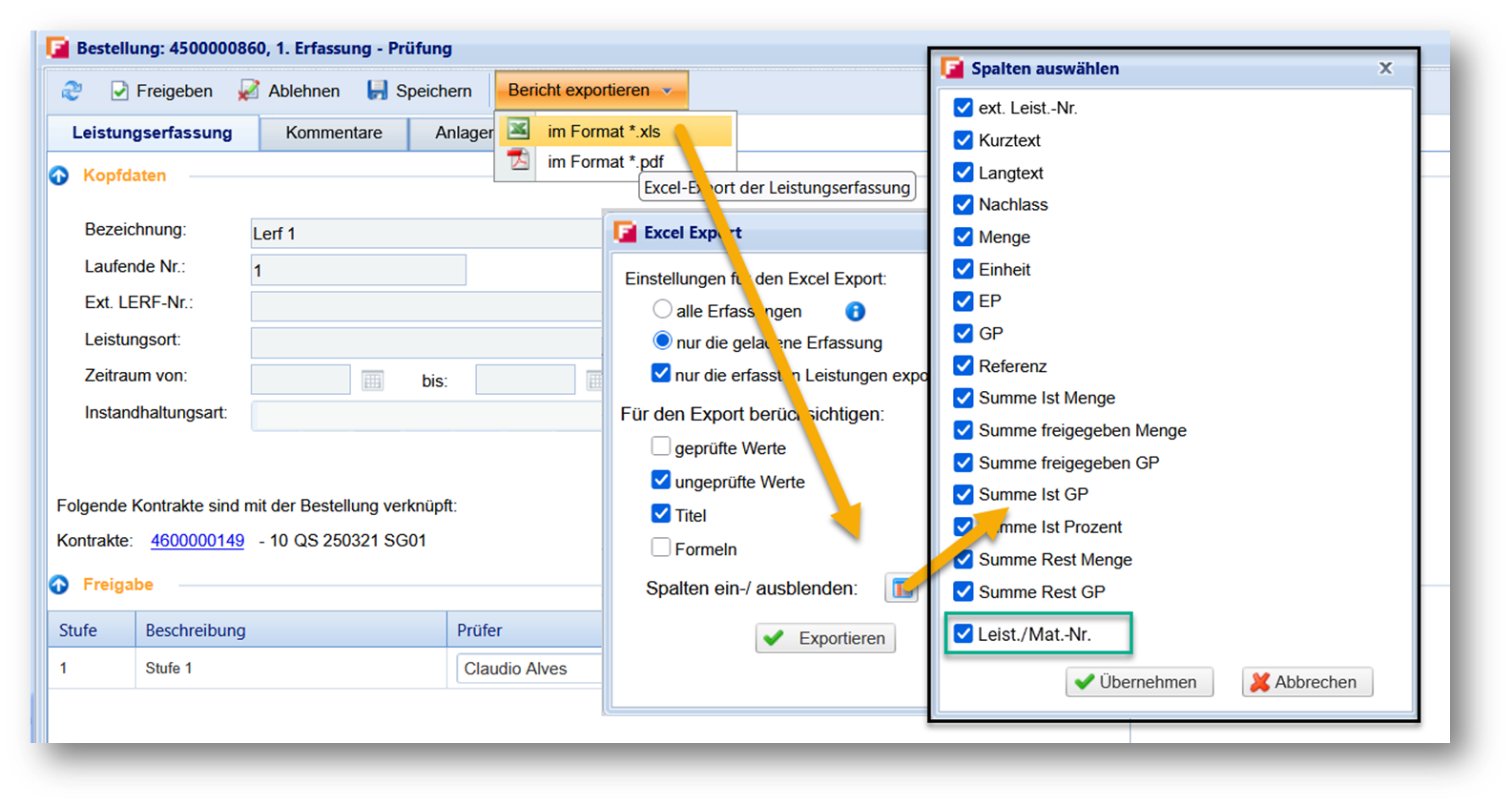
With version 5.9, the LERF reports have been expanded so that important position information is available to you even more conveniently. The information Performance/Mat. No. is now available in both the Excel and PDF reports, thus ensuring a uniform presentation between the Lerf overview and the report output.
Highlights
-
Flexible display of the column "Performance/Mat. No." in the Excel report
-
Standard display of the column in the PDF report
-
Optimized layout for better readability
-
Consistent and complete presentation of all relevant information
The existing column Ext. benefit no. will continue to be available unchanged.
Request For Quotations
Transfer of settings in copy
Adoption of presets and settings during copying
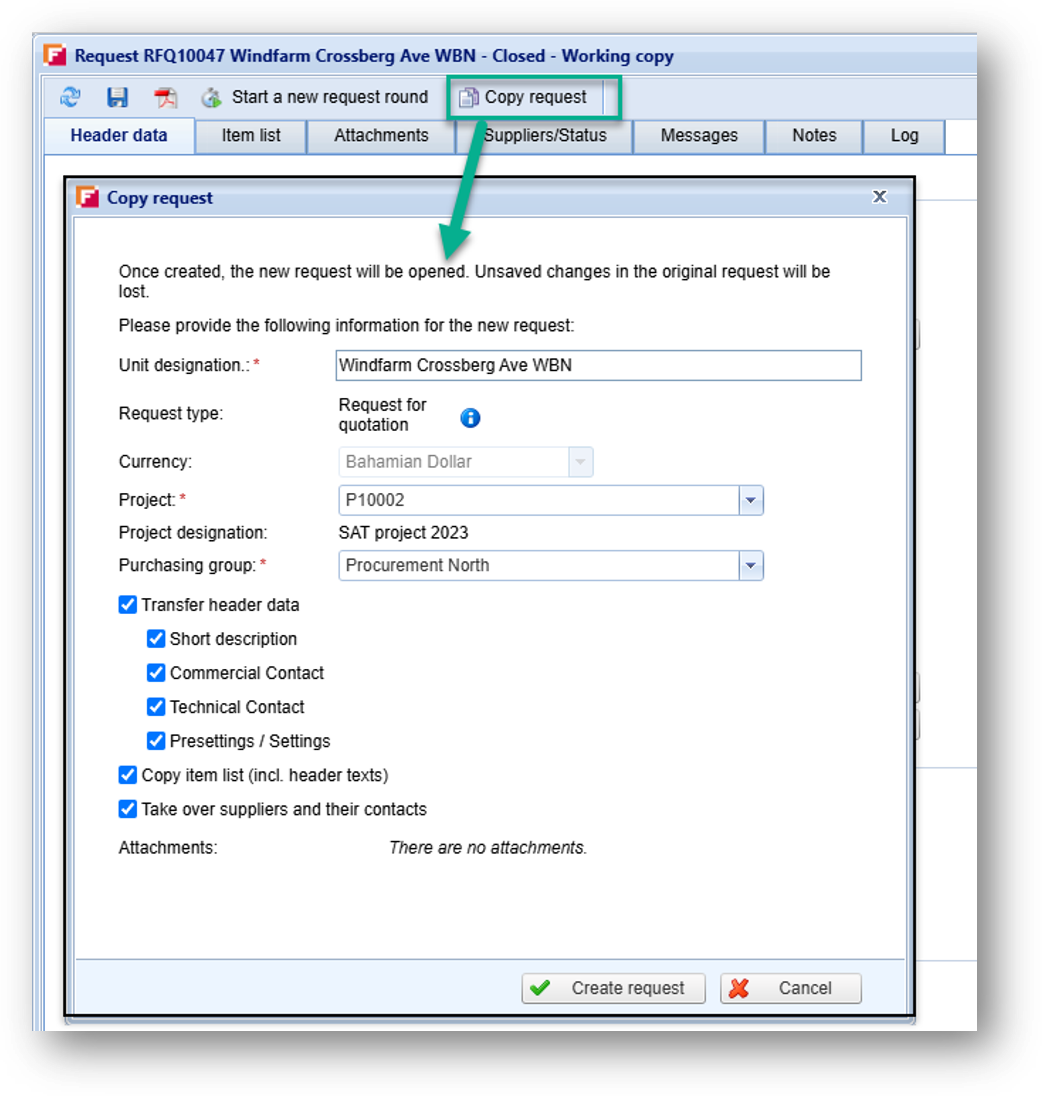
When copying a RFQ, you can now also apply the defaults and settings of the original RFQ. For this purpose, a new option is available in the copy dialog, which is activated by default. In this way, important configurations on the cover page are also included in the copy.
Price Comparison List
Stability for large amounts of data
Support for up to 20,000 service items
Fixed a critical issue when opening price comparison listes with very large amounts of data. In certain scenarios, this led to long loading times and ultimately a system error. The processing of large amounts of data has been stabilized so that even extensive price lists can be opened reliably.
Service Entry Sheet
Further Information Column
Improved traceability of order origins
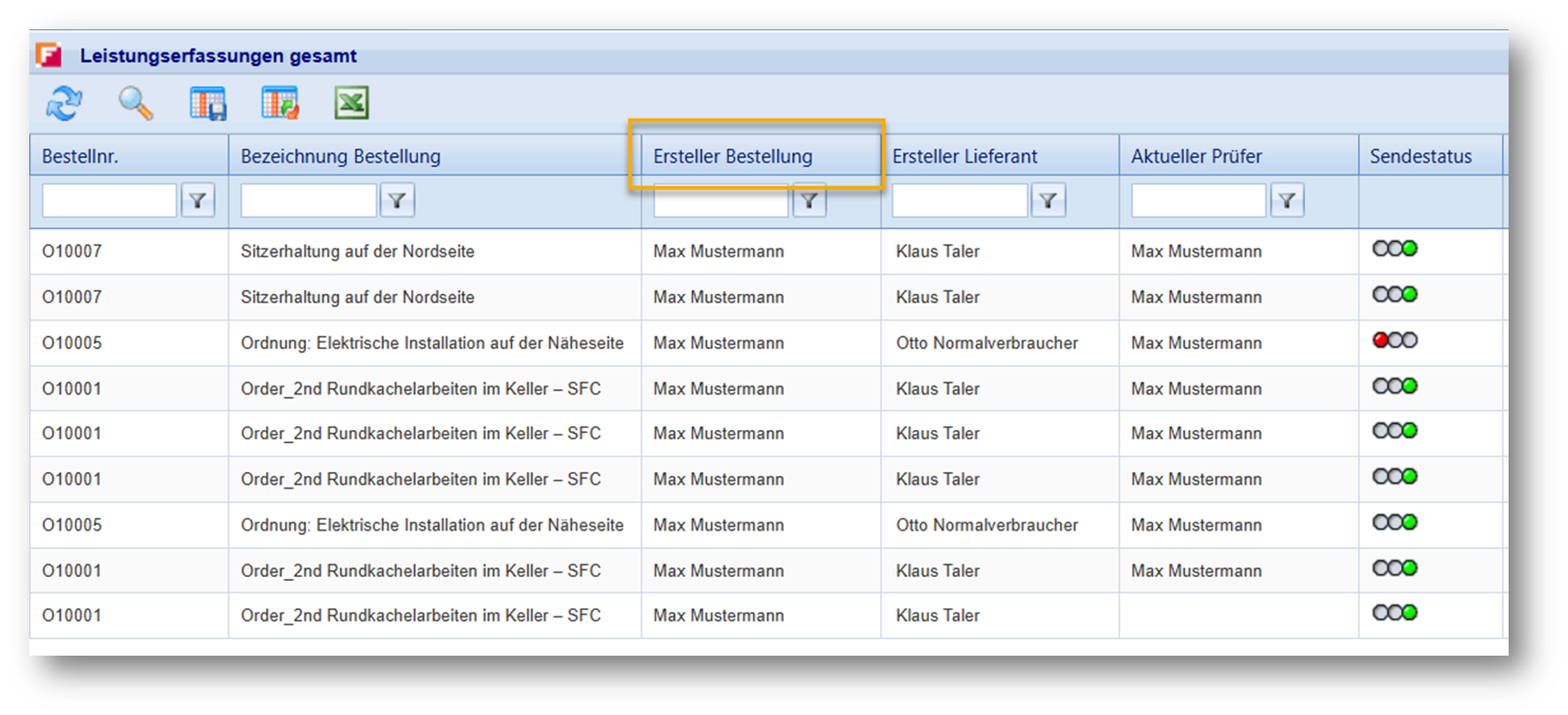
An additional column has been introduced in the overview of service journals that shows the creator of the associated purchase order. This information improves transparency and traceability, especially in customer-specific scenarios, as relevant references are directly visible.
Excel Reports
Reports in XLSX format
Optimized Excel Export
The Excel export functionality has been enhanced and now generates files in XLSX format. This allows exported files to be opened in Microsoft Excel without warning messages. In addition, the formatting of exported files has been standardized to provide a consistent and improved output across the entire application.
Request For Quotations
Optimizations for large item lists
Analysis and preparation of further optimization steps
For RFQs, additional analysis work was carried out for item lists. The aim is to prepare future performance optimizations in a targeted manner. These measures form the basis for further improvements in future versions.