
Importing Item List Templates from SAP
With the Import item list template function, you can transfer existing template item lists directly from SAP into FUTURA Engineering and use them for requests.
This eliminates the need to manually recreate extensive service positions. At the same time, it ensures that requests for quotation are based on standardized and centrally maintained data.
A template item list in SAP typically consists of headings, subheadings, and individual services. During the import, a complete item list structure is automatically created within the Demand, Request, and Order module in FUTURA Engineering.
Requirements for Using the Function
The function must first be set up and configured by FUTURA. If you would like to use the function and the menu entry is not visible in your system, please contact your FUTURA administrator or contact person. The required configuration will be carried out by FUTURA.
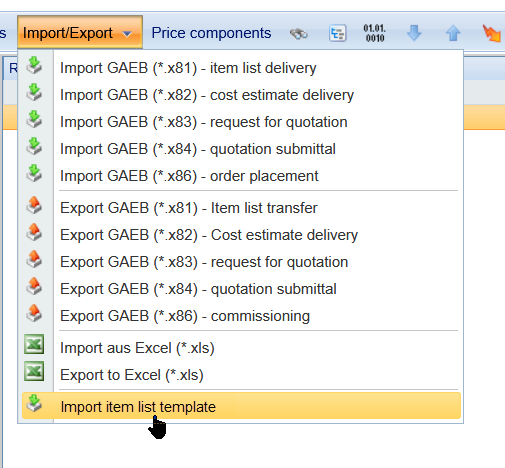
Once the setup has been completed successfully, the menu item Import item list template will be available within the request for quotation under Import/Export.
Using the Function
Within a request for quotation, you can open the import dialog via the menu item “Import item list template”. The available template item lists will then be displayed. Using the search function, you can search specifically for a certain number or description.
After selecting a template item list, the import starts automatically. FUTURA Engineering then creates a complete request position including all headings, subheadings, and services.
This allows a request for quotation to be populated with a complete item list structure within just a few seconds.
Reimporting a Template Item List
A previously imported template item list can be imported again from SAP. This is especially useful if contents or positions have changed in the SAP system.
During a reimport, the existing item list is completely overwritten. Before overwriting, a corresponding warning message is displayed for confirmation.
However, reimporting is only possible as long as the request for quotation has not yet been started. Once the request for quotation has started, no further import is possible.
Suppliers and RFQ Rounds
The function supports the complete request for quotation process in FUTURA Engineering. After importing the template item list, you can:
-
assign suppliers,
-
define submission deadlines,
-
start requests for quotation, and
-
carry out multiple RFQ rounds.
If changes are made to the request for quotation, existing supplier processing remains intact. Suppliers are automatically informed about changes and only need to maintain the adjusted content.
Important Note Regarding Purchase Requisition Assignment
When using the template item list import, the assignment to a purchase requisition should not already be carried out during the request phase.
Instead, the purchase requisition assignment should only be completed later in the process step “Order in Preparation”. Otherwise, a later purchase requisition import may overwrite the existing item list.
Additional Notes
When displaying the available template item lists, blocked or deleted entries are automatically filtered out. This ensures that only valid and approved template item lists are available for selection.
The function is particularly suitable for recurring requests for quotation or standardized services, as existing item lists can be reused quickly and consistently.
Thanks to the direct integration between SAP and FUTURA Engineering, the RFQ process is significantly accelerated and manual maintenance effort is reduced.